Getting started — where to sign in
Control room engineers
Sign in at /login with your work email. First time? Use CREATE ACCOUNT, then either create your organization (you become its admin) or paste the invite code your admin sent you. You land in Front of House, signed in and ready to cast. Your session persists across visits; use Forgot password? on the sign-in card to reset by email, and SIGN OUT in any top bar to leave.
Admins invite the rest of the crew from PROFILE → ORGANIZATION → GENERATE INVITE LINK — each link is one use, and can grant the engineer or admin role.
Guests / callers
Guests never see the console. They sign in at /greenroom (any email works — CREATE ACCOUNT is self-serve), then press ▶ START A SESSION WITH ANNIKA. If they arrived through your org's Green Room link, CuePilot starts a full live broadcast with your house persona — Annika answers in real time and the broadcast automation (snap cues + the Director) kicks off on its own; the session appears immediately as a LIVE card on your Broadcast Ops dashboard. Without an org link it falls back to a free demo. Callers invited to a live air don't need any account — the engineer sends them a Set link or QR code from the Gallery instead.
CuePilot Documentation
CuePilot is a TV-style control room for a life-like AI avatar. While a caller talks with Annika over a live video feed, the system hot-swaps silent, pre-rendered gesture clips over the feed on a canvas Program bus — supervised by an engineer, driven by keyword rules and an AI planner.
Vocabulary
| Gallery | The engineer's live console — the vision-mixer view. |
| The Set | The caller-facing page at /air/<session>?t=<token>. |
| FOH | Front of House — pre-air setup: keys, casting, persona, snap cues, notebook, launch. |
| Cart Wall | The library of pre-rendered gesture clips (“carts”). |
| The Director | The Claude-based planner that stages and fires cues (Tier-2). |
| Snap Cues | Keyword→clip rules (Tier-1), live within ~30 s of editing. |
| Autopilot | Auto-rolls an armed cue after a 2-second standby window. |
| Annika's Notebook | Persona memory, rebuilt after every air. |
| Edit Bay | Higgsfield — where new gesture clips are cut. |
The caller's guide — the Set
Getting in. The engineer sends a link or QR code. Opening it lands the caller in a greenroom lobby: type an optional name, press ENABLE CAMERA & MIC to check the self-preview, then ▶ JOIN. If camera or mic is blocked they can still join and listen. In demo airs the camera step is hidden and the button reads ▶ START.
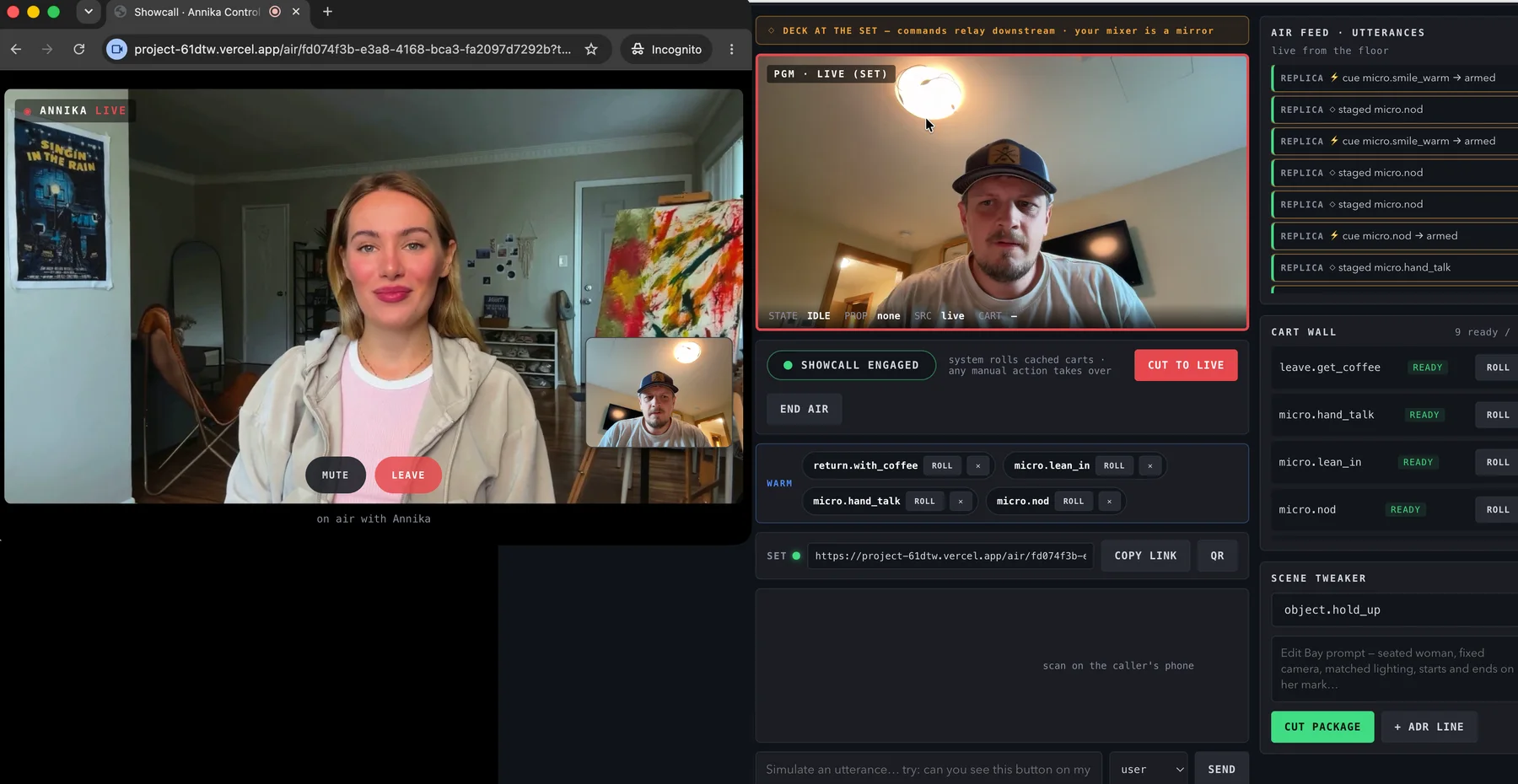
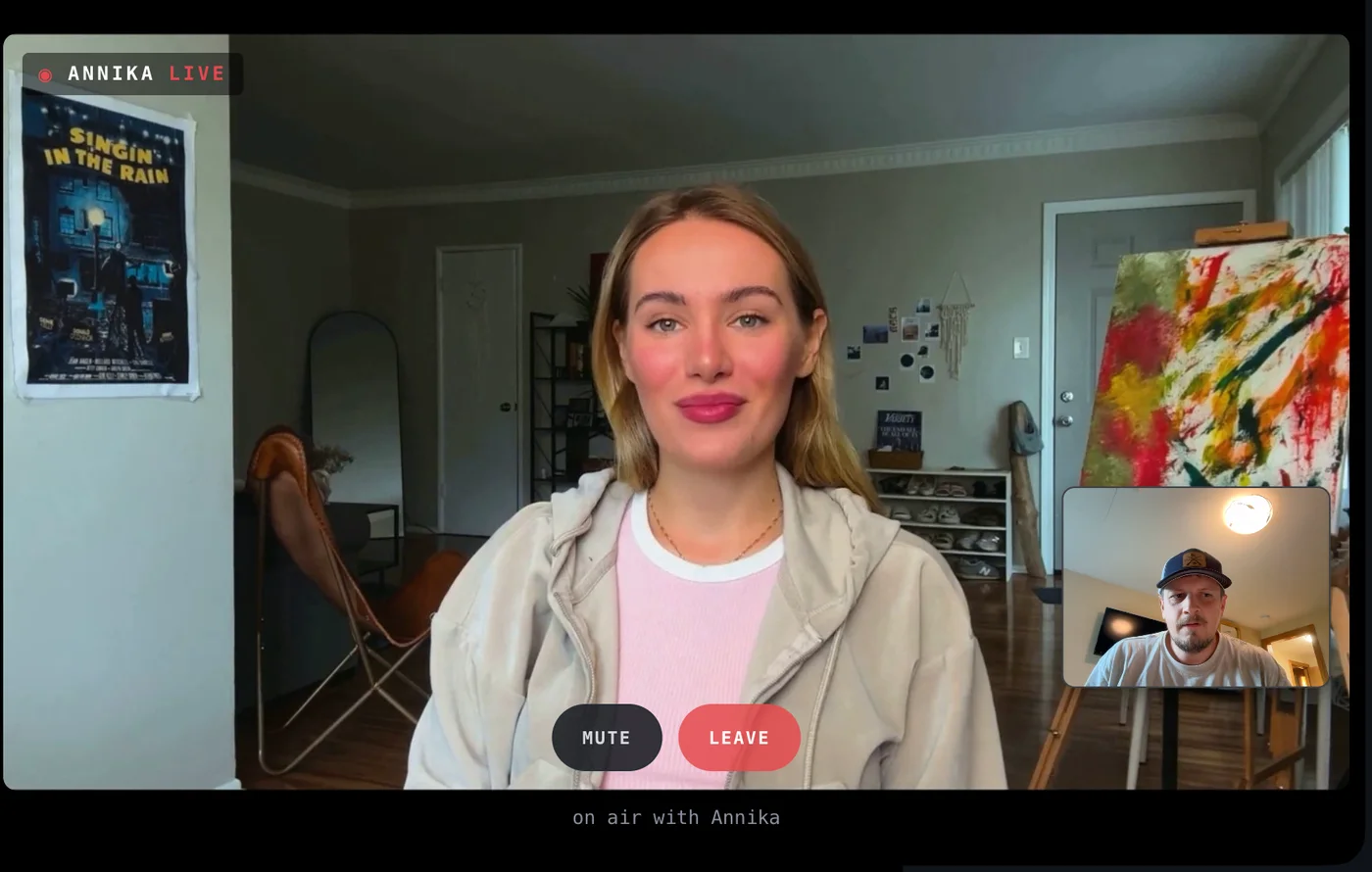
On air. Annika appears full-frame with a LIVE badge, the caller's own camera in a small PiP bottom-right, and two controls: MUTE and LEAVE. Gestures — a shrug, a lean-in, going for coffee — play over the live feed automatically. If the caller speaks mid-gesture, CuePilot cuts back to live within a beat.
The wrap card. When the air ends, the caller sees “THANKS FOR TALKING WITH ANNIKA” with the reason: You left the call · The control room wrapped this air · Annika left the set · This air has already wrapped. The first reason shown is the one that sticks.
Front of House — before the air
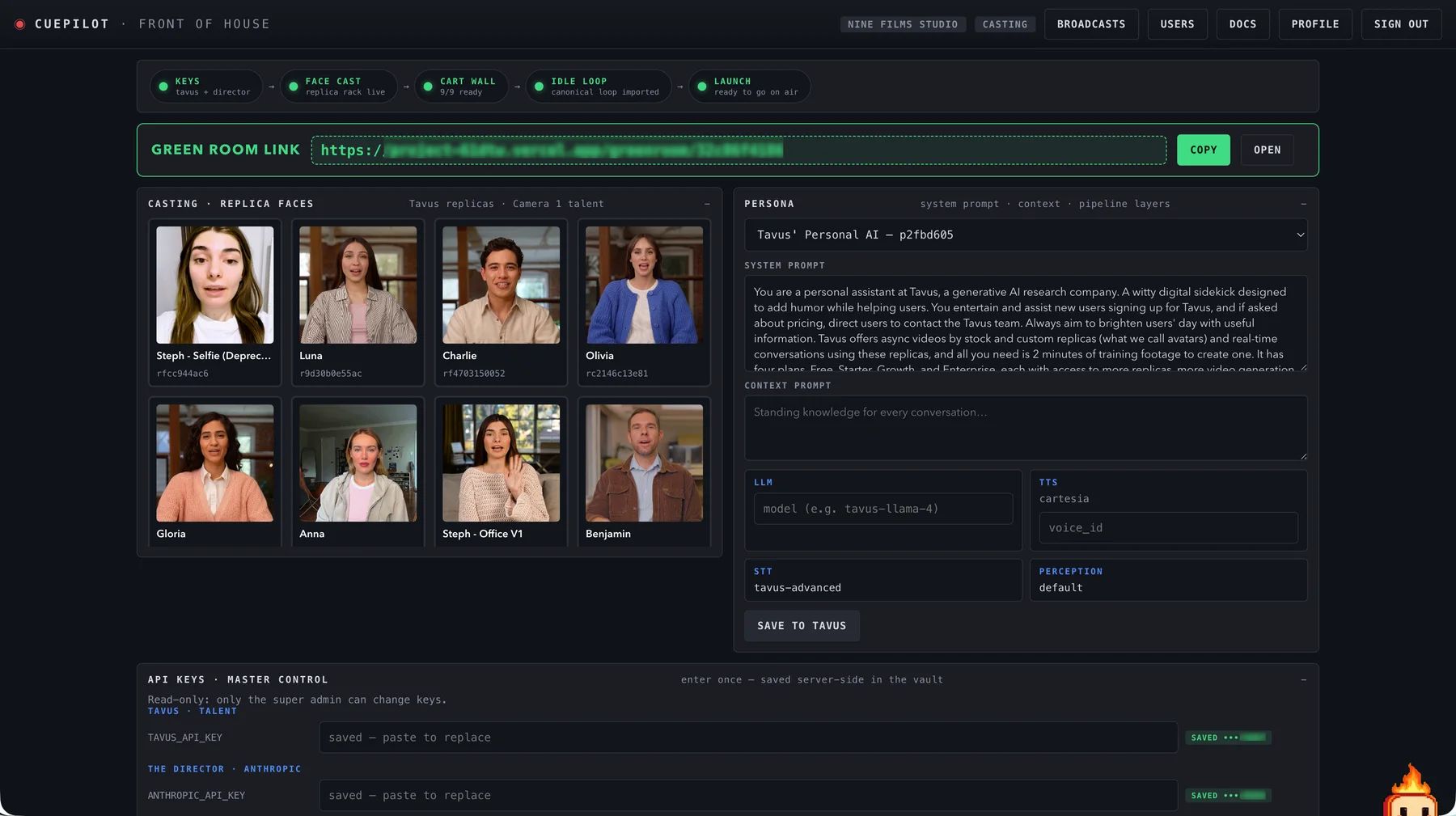
Work top to bottom; the readiness stepper (KEYS → FACE CAST → CART WALL → IDLE LOOP → LAUNCH) tracks progress and each chip scrolls to its panel.
API keys. Paste provider keys once — Tavus (talent), Anthropic (the Director), Higgsfield (Edit Bay), Cartesia + sync.so (ADR), webhook secret, optional R2 storage. Keys are stored server-side; Tavus/Anthropic/Cartesia are validated live on save. Only the super admin can edit keys.
Casting. With a Tavus key saved, the replica rack lights up — click a face to cast it as Camera 1 talent. Pick a persona and edit its system prompt, context, LLM and voice; SAVE TO TAVUS patches it in place.
Snap cues. Add phrase → gesture rules with a cooldown. Keep phrases lowercase and specific (“let me show” beats “show”). Rules go live within ~30 seconds.
Notebook. Annika's memory — LAST AIR, DIRECTOR'S NOTES, RECURRING PEOPLE, STANDING CONTEXT — rebuilt after every air. The INJECT MEMORY AT LAUNCH toggle controls whether it's folded into the next conversation.
Launch. Optionally write tonight's conversational context, then either ▶ LAUNCH SESSION (creates a real, billed Tavus conversation) or ENTER DEMO GALLERY (same console against the idle loop — guaranteed free, even with real keys saved).
The Gallery — on air
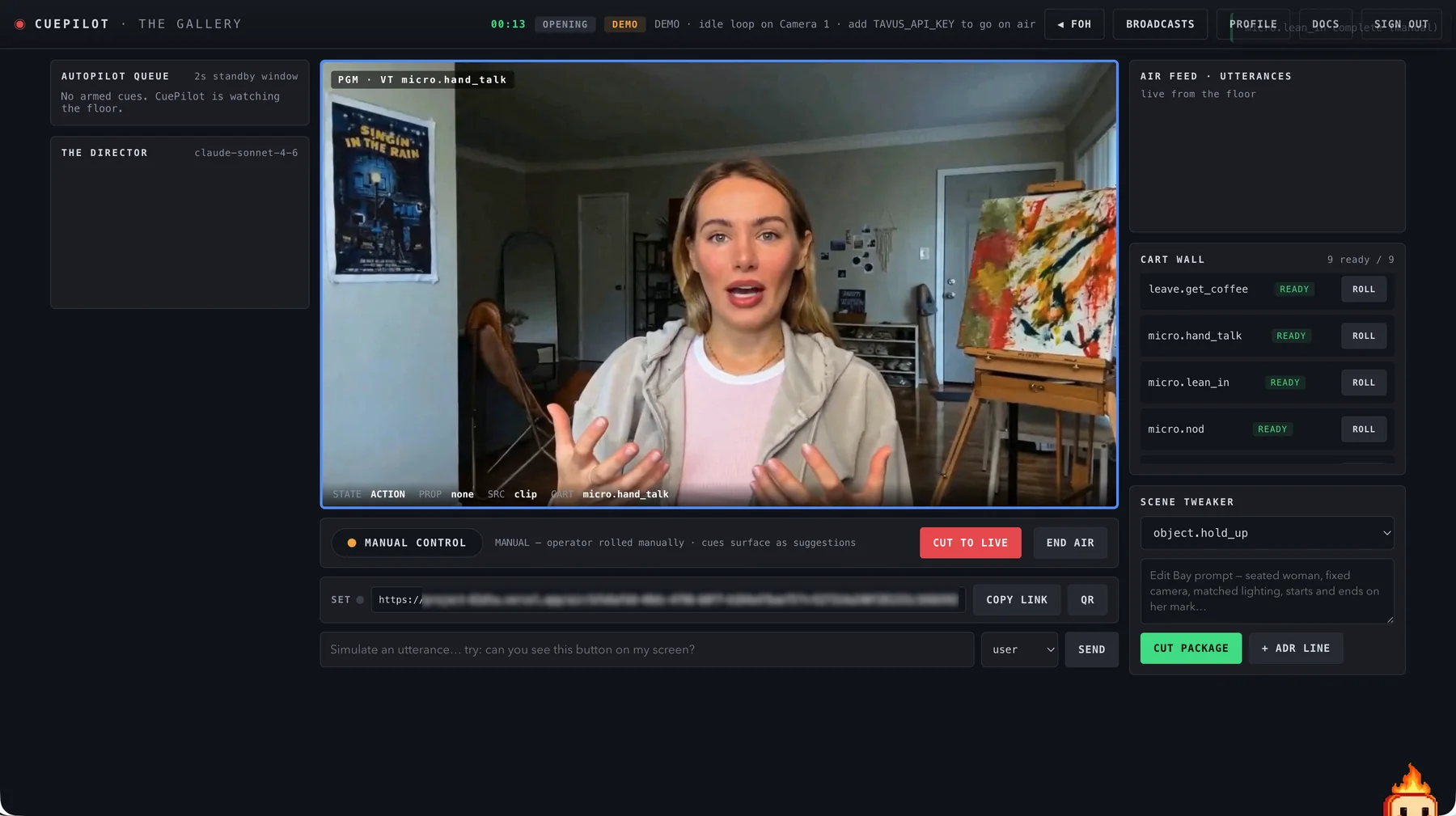
The PGM monitor is the center of the room; its border is the tally light: red LIVE, blue VT (cart rolling), amber TRANSITION, magenta INTERRUPT.
Pilot bar. CUEPILOT ENGAGED (autopilot) rolls cached carts automatically; any manual action flips to MANUAL CONTROL and cues surface as suggestions instead. Click the toggle to re-engage. CUT TO LIVE is the big red switch: kills the current cart, interrupts Annika, returns to the live feed.
Autopilot queue. Armed cues appear with a filling 2-second ring — do nothing and they roll, or CANCEL. WARM shelf: carts the Director stages persist until rolled or dismissed. Cart Wall: every cart with status and a manual ROLL. Scene Tweaker: cut a new gesture package in the Edit Bay mid-show (CUT PACKAGE), or add a Cartesia voice line (+ ADR LINE).
The Director panel streams the planner's reasoning and show phase. The air feed is the live transcript; cue hits are outlined. In demo airs a “simulate an utterance” box under the monitor exercises the whole trigger → planner → roll pipeline.
Casting the Set to a caller
When a session has an air token, the SET strip appears under the monitor: COPY LINK or QR. Once the caller's device connects, the heartbeat dot turns green and “DECK AT THE SET” appears — from then on your mixer is a mirror: the caller's device plays the carts and your ROLL / CUT / mode commands relay downstream.
Screen Guidance — how the extension works, end to end
Screen Guidance lets Annika annotate the presenter's own browser during a live air. The presenter shares their screen into the Daily call, asks a "where is / how do I" question, and the platform interrupts the persona, draws a marker in the presenter's actual browser through the CuePilot Guidance Chrome extension, and only then has her speak a line that matches the marker. To the end user it reads as the AI viewer reaching through the call and pointing at their screen.
Architecture — the loop, in order
- Trigger. On the Set, guidance intent is detected on the presenter's own utterances (
conversation.utterance, role user) while a screen share is active — "where's…", "show me…", "which button…". Demo sets use a typed ask bar instead of voice.
- Persona takeover. Tavus runs the replica autonomously and would answer the same question verbally, so the app seizes the floor first:
conversation.interrupt if she's mid-sentence, wait for replica.stopped_speaking, and while held, any unsolicited replica speech is re-interrupted instantly. A one-line filler ("One sec — let me point at it for you.") covers inference latency, IT-support style.
- Backend vision. A single frame of the local screen-share track is captured client-side (≤1568px webp) and POSTed to the
guidance-ground edge function with the air token. It runs Claude vision (Anthropic key from the vault) and returns strict JSON: bbox, tool, confidence, a speakable instruction, and a requires_confirmation flag for destructive controls. Frames are analyzed and discarded — never stored.
- The Router. The Set publishes
annotation.command on the private Supabase Realtime channel guidance:{id}. Row-level security on realtime.messages means only the session owner's clients can join or send — the extension and the Set page authenticate as the same signed-in end user.
- Render, then speak. The extension validates the surface (tab switches and navigations mint a new
surfaceId and cancel stale plans), draws the marker in a closed-shadow-root overlay, and acks annotation.rendered — on extension 2.0, followed by a paint-verified annotation.visible. Speech is gated on that ack: the persona never says "the button I've highlighted" before the highlight exists. Every failure mode has a spoken fallback — low confidence asks the presenter to scroll and re-ask; no extension goes verbal with the description; a declined chip degrades gracefully.
Coordinate contract
Vision output is normalized to the visible page viewport inside the frame — the model finds the browser window and its content area itself. That's why both share modes work: sharing a single browser window and sharing the full screen with a browser visible in it both land the marker on the right control.
Security & trust model
Markers only — the extension has no ability to click, type, read page content, or exfiltrate anything; it reports the page's origin, never its content. High-risk targets (delete, purchase, permissions) require the end user's explicit Show me confirmation before anything draws. A persistent red Stop chip on the guided page broadcasts session.stopped to every peer — the operator-side pill flips to "markers stopped" immediately. Sessions expire server-side after two hours.
Extension 2.0 — the visual guidance runtime
Guidance 2.0 (extension v2.0.0) upgrades the renderer from single markers to composed, choreographed guidance while keeping every contract above intact. Current clients need no changes: 2.0 still emits the legacy events (annotation.rendered / .rejected / .declined) alongside its new ones.
- Presentation vocabulary. One command can layer a synthetic cursor glide, a spotlight cutout, shape markers, a callout card, and a ghost-stroke gesture demo into a single choreographed sequence (caps: 6 presentation commands, 24 active objects per surface).
- Plans. Multi-step walkthroughs render one step at a time with end-user Done / Not there / Skip controls; tab switches and navigations still cancel stale plans via the surface rules above.
- Paint-verified acks. 2.0 adds
annotation.visible, emitted only after the composition has demonstrably painted — the strongest signal to gate persona speech on, with a per-annotation speechCueId round-tripped for tight timing.
- Feedback events. Got it / Not there and per-step results return as
guidance.feedback, so the Director can re-ground instead of repeating itself.
- Risk-gated consent. Targets classed sensitive, destructive, financial, or permission-related always interpose the end-user consent chip; an orchestrator can force confirmation on, never off.
- Pause is absolute. Operator pause clears every overlay instantly and rejects incoming commands as
PAUSED; nothing queued redisplays on resume — resume, then re-issue.
Driving 2.0 from the platform side — publishing compositions and plans, consuming guidance.ack, gating speech on annotation.visible — arrives with client v0.19.6. Until then the loop runs exactly as documented above, rendered by the 2.0 runtime.
Operations runbook
- Rolling it out to an org's end users: send them
/extension — self-serve download, three-step unpacked install, one-click connect, and a built-in rehearsal path. The zip is versioned with the deploy at /downloads/cuepilot-guidance-extension.zip. (Chrome Web Store listing is the planned end-state; until then, load-unpacked is the supported install.) Upgrading a fleet from v1: same page, same zip URL — the Upgrade from v1 steps are on it, and mixed v1/2.0 fleets stay compatible mid-rollout.
- Rehearsing without Tavus cost: a Green Room session with no org link is a free demo Set running the identical pipeline — typed asks, real vision, real markers, persona lines in the status ribbon. Use it to train staff and demo to clients.
- On-air reading: the Set's GUIDE pill tells you the state — READY (linked, private channel joined), looking… (plan in flight), verbal only (no extension — she still answers, just without markers), markers stopped (end user hit Stop).
- Triage: extension NOT DETECTED on
/extension → reload the page after install and check the puzzle-piece menu. Linked but "verbal only" on the Set → the end user isn't signed in to the extension (Connect on /extension). Marker lands oddly after a tab switch → expected: stale-surface cancellation makes her ask them to re-ask on the current page. All markers vanished mid-air → the end user hit Stop (pill: markers stopped) or an operator paused from the extension popup — 2.0 clears everything on pause by design; resume, then re-ask. Backend health → guidance-ground logs in the Supabase dashboard.
Ending an air & memory
Press END AIR and confirm. The Set shows the wrap card, tally goes to PGM · WRAP, and the memory worker rebuilds Annika's Notebook — check it in FOH a few moments later.
Organizations, roles & invites
CuePilot is multi-tenant. The first engineer to sign in creates an organization and becomes its admin; everyone else joins with an invite. From Profile → Organization an admin can generate invite links (engineer or admin role) — send the link, the invitee signs up, and they land in your control room. Your profile (display name, title) is saved to your account and follows you across sessions.
Your org's Green Room link & guest persona
Every organization has a shareable Green Room link — it sits front and center on the console home, the Broadcast Ops dashboard, and the USERS page (visible to admins and broadcast operators alike), and also under PROFILE → ORGANIZATION → GREEN ROOM. It looks like /greenroom/<code> — a dedicated sign-up URL for your organization. Anyone who opens it sees your org's name on the Green Room card, can sign up or sign in self-serve, and can launch sessions on demand — no invite needed, and they never gain access to your console. Accounts created through your link are bound to your organization: the binding lives on the account itself (one org per end-user account), so your end users stay yours even if they later open the Green Room from another device or a bare link — and another org's link cannot claim them.
Sessions launched through your link use your org's guest persona (default pdf3d8082032). Any engineer or admin in the org can change it: paste a Tavus persona id into the field next to the link and press SAVE PERSONA. The change applies to every subsequent guest launch.
Managing your end users. Everyone who signs in through your link and launches a session appears in PROFILE → ORGANIZATION → END USERS — email, display name, session count, and last-seen time. The roster is visible to every member of your org.
Guest sessions — the Green Room
End users don't touch the console. They sign in at /greenroom (ideally via your org's shareable link, above) and press START A SESSION WITH ANNIKA — CuePilot starts a live broadcast with your org's persona and drops them straight onto the Set at their own /air/… link. No engineer needs to be present: Tier-1 snap cues and the Director run server-side and conduct the cart wall automatically, and the session shows up LIVE on Broadcast Ops where any operator can watch or step in. Engineers casting a live (billed) air still send callers a Set link or QR from the Gallery. The guest-facing guide lives at /docs/guest.
How it works — the two planes
CuePilot runs a broadcast on two planes. The control plane is your browser: the Gallery, the Director, the databases. The playout plane is wherever the picture is actually composited — your machine until a caller connects, then their device. Why: video that has to look seamless should be assembled on the screen that displays it. Shipping cut commands (tiny JSON over a realtime channel) is instant and lossless; shipping composited video across networks is neither.
The Program bus is a canvas vision mixer. The live Tavus feed (Camera 1, a WebRTC track via Daily) draws to the canvas every frame; when a cart rolls, its video element alpha-crossfades over the live feed in about a quarter second, plays, and crossfades back. Carts are silent by design — Annika's voice keeps coming from the live track underneath, which is why speech never stutters during a gesture. Away-gestures (coffee run) additionally duck and low-pass her audio so the room sounds like she stepped away.
Continuity comes from anchors and props. Every cart starts and ends on a fixed frame — home_pose or empty_chair — so any legal sequence of carts is seamless. Carts declare what prop state they need and produce (none / coffee_mug): the scene state machine refuses a coffee-fetch when the mug is already out, and knows the only legal exit from an empty chair is a return clip.
When the caller's deck is live, your Gallery becomes a mirror: the Set sends a heartbeat every 10 seconds and scene reports on every state change; your monitor re-renders from those reports, and your ROLL / CUT / mode toggles relay downstream as broadcast commands. The green dot and “DECK AT THE SET” banner tell you which plane is playing out.
The trigger system — two tiers plus a veto
Tier 1 — Snap Cues. Keyword rules stored in the database and evaluated server-side the moment an utterance arrives. Sub-second, deterministic, cooldown-limited. Use them for reliable verbal tells: “let me show you” → screen.lean_look. Edits go live within ~30 seconds because the Set refreshes its rule-driven carts on a timer — no redeploy.
Tier 2 — the Director. A Claude model (claude-sonnet-4-6) that receives the rolling transcript, current scene state, prop state, show phase, and the cart inventory, and decides what to prep (warm the cache), stage (put on the WARM shelf), or fire (arm for autopilot). Its reasoning streams into the left rail so you can audit every call it makes. Use it for judgment: pacing, tone, when a coffee-break lands as charm rather than rudeness.
The veto. A fired cue arms with a 2-second ring before rolling. Those 2 seconds are the human override window: CANCEL kills the cue and drops the room to MANUAL CONTROL, where everything the machines want becomes a suggestion chip instead. CUT TO LIVE is the hard override at any moment — kills the cart, interrupts Annika mid-sentence, returns to the live feed. Re-engage autopilot with one click on the pilot toggle. The design rule throughout: the machine proposes, the engineer disposes.
Interruption handling is automatic on both planes: when the caller starts speaking mid-gesture, the state machine flags INTERRUPTED and force-cuts to live within ~0.8 s — unless Annika is “away”, in which case the return-with-coffee cart plays first if it's cached, because an empty chair snapping to a seated Annika would break the illusion.
Session lifecycle & memory
Launch. create-session authenticates you, reads the key vault, ensures your persona record, and seeds the Cart Wall on first run (master clip catalog if imported, synthetic placeholders otherwise). Unless the launch is a demo, it then creates the Tavus conversation (optionally injecting Annika's Notebook, marker-bounded and capped at 6,000 characters) and mints a random 16-byte air token — the capability that admits exactly one Set to exactly one session.
On air. Utterances flow in from two directions — the Gallery observing the Tavus event stream, and the Set posting through its token-authenticated uplink (with an outbox that retries, so flaky caller networks don't drop transcript). Every utterance is matched against Snap Cues and folded into the Director's context. Triggers, cart changes, and planner runs stream back to the Gallery over realtime subscriptions.
Wrap. END AIR (or ◀ FOH, or the caller leaving) marks the session ended and queues the memory worker, which distills the transcript into the Notebook: LAST AIR, DIRECTOR'S NOTES, RECURRING PEOPLE (with weighted contact memory), STANDING CONTEXT, plus a one-line recap. Next launch, that memory is injected into her conversational context — which is how Annika remembers your regulars. The injection is non-destructive and delimiter-bounded so it can never bleed into or overwrite her persona prompt.
Security & tenancy model
Tenancy. Organizations own the human side: membership, roles, invites, the guest link, the guest persona. Every table is under row-level security; org rows are visible only to members, and all writes go through audited database functions that re-check membership server-side — the browser is never trusted.
Capabilities, not cookies, for callers. The Set never authenticates a caller — the air token in the link is the authorization, scoped to one session, useless after wrap. That's why live callers need no account and why an old link politely says the air has wrapped.
Invites are single-use random codes minted only by org admins; guest links are deliberately public (that's their job) and expose only the org's name and guest persona through a read-only lookup. Provider keys live server-side in the vault, are editable only by the global super admin, masked in the UI, and validated live against each provider on save. Demo cost safety is enforced twice: the demo button sends an explicit flag, and the server refuses to create a billed Tavus conversation whenever that flag is present — regardless of what keys are saved.
Runbook — checklists & troubleshooting
Pre-air checklist
Readiness stepper all green (KEYS validated ✓, FACE CAST selected, CART WALL ready-count > 0, IDLE LOOP imported) → write tonight's conversational context → decide memory injection → ▶ LAUNCH. For rehearsal, ENTER DEMO GALLERY and drive the pipeline with the simulate-an-utterance box.
On-air standard practice
Watch the tally, not the transcript. Keep autopilot engaged until it earns distrust; one CANCEL puts you in manual. Cast the Set link early so the caller's deck preloads carts. If a cart shows PRELOADING on the wall, it isn't cached at the Set yet — don't force it.
Symptoms → causes
“gateway: invalid token” on the Set — link mangled or from a previous session; re-copy from the SET strip. “cart not playable yet” — still preloading or its media URL is unreachable; check the wall status and the clip's storage URL. Join failed on the Set — Tavus conversation expired or maxed out; end and relaunch. Casting rack empty — TAVUS_API_KEY missing or invalid; SAVE KEYS revalidates live. Director silent — no ANTHROPIC_API_KEY, or the session is manual-phase; check the keys panel first, then the edge-function logs in Supabase. Notebook empty after a wrap — memory worker needs the Anthropic key too; recaps appear a few moments after END AIR, not instantly. Password-reset email points at the wrong host — Supabase Auth → URL Configuration → Site URL must be the production domain.
Escalation
Edge-function logs live in the Supabase dashboard per function (create-session, ingest-utterance, clip-planner, memory-worker). Vercel build/runtime logs cover the client. When in doubt: end the air cleanly, relaunch — sessions are cheap, trust is not.
Users — team & end-user management (/app/team)
The USERS area gives org admins full control and broadcast operators a live view — team members, invitations, and Green Room end users in one place, with the org's shareable Green Room link pinned at the top. Team members: every admin and operator with email, role, and status. Admins can change roles (operator ↔ admin), deactivate / reactivate members (a deactivated member keeps their account but loses all org access instantly), and remove them outright — the org owner is protected from all three. Invitations are single-use links that expire after 7 days, minted for a specific role; the list shows each invite's status (pending, used, expired, revoked), who redeemed it, and lets admins copy a pending link again or revoke it. End users: the guest roster with session counts and last-seen times; admins can disable a guest's access to the org's Green Room (and re-enable it) — a disabled guest is refused at launch.
Broadcast operations — /app/broadcasts
The live board for everyone in the control room. Each end user in your org appears as a card: name, email, status pill, and session details. LIVE (red) means an unfinished session with a fresh deck heartbeat — the card shows when they went on air, the show phase, seconds since the last heartbeat, and an OPEN BROADCAST button that opens their Set. STANDBY means not currently connected — the card shows their session history instead. The board auto-refreshes every 10 seconds, counts LIVE and STANDBY in the header, sorts LIVE cards first, and supports name/email search plus a status filter. Visible to admins and operators; guests can never see it.
Navigation map
Every page, and every way off it:
| / (marketing) | Docs · Guest guide · Green Room · SIGN IN / OPEN CONSOLE (auth-aware) · footer links. |
| /login | Logo → home · ‹ Back to home · Docs · Green Room link · Forgot password. After sign-in → /app. |
| Onboarding card | Create org / join code → /app · SIGN OUT · ‹ Back to home · Docs. |
| /app (FOH) | DOCS · PROFILE · SIGN OUT · ▶ LAUNCH / ENTER DEMO → Gallery. |
| Gallery | ◀ FOH (confirms, ends the air, returns to Front of House) · PROFILE · DOCS · SIGN OUT · END AIR. |
| /app/profile | BACK TO CONSOLE · DOCS · SIGN OUT · PLATFORM (super admin only). |
| /app/team | BROADCASTS · CONSOLE · PROFILE · SIGN OUT. Admins manage; operators view. |
| /app/broadcasts | USERS · CONSOLE · PROFILE · SIGN OUT · OPEN BROADCAST on live cards. |
| /admin | CONSOLE · PROFILE · DOCS · SIGN OUT. Super admin only; others see an access notice. |
| /docs & /docs/guest | Logo → home · Guest guide / master docs cross-links · Green Room · SIGN IN / OPEN CONSOLE (auth-aware). |
| /greenroom | Logo → home · ‹ Back to home · How it works (/docs/guest) · Console sign-in · START → the Set. |
| The Set (/air/…) | Deliberately sealed: JOIN/START, MUTE, LEAVE only. Callers shouldn't wander mid-air. |
 CUEPILOT